Once the operating period ends, the last job is sending your entry to the ARRL. The entry itself is the ARRL's web form, where you fill in your details, check off the bonuses you earned, and upload your log and proof. Field Day Commander gives you the Cabrillo log and a submission sheet with the numbers the form asks for. This guide covers checking it all over, downloading the files, and what to have on hand when you fill out the form.
You'll need to be an admin or event manager to open the Reports page. Running Winter Field Day instead? The steps are the same up to the downloads, but the WFDA has its own form. See Winter Field Day in the reference docs.
Step 1: Finish the Log
Paper logs are the usual loose end. If any station kept one, enter it under Logging > Transcribe Paper Log. You don't have to do it the same weekend. For 30 days after an event ends (the Post-Event Grace Period under System Settings > System Preferences), Field Day Commander keeps it as the current event, so late contacts, the Scoring page, and Reports all still point at it.
After the grace period, pick the event from the event selector at the top of the sidebar to work with it again.
Step 2: Check the Event Details
The Cabrillo log and submission sheet are built from the event form, so open the event in Administration > Events and look it over. These are the fields that end up on them:
- Station Callsign, ARRL/RAC Section, Operating Class, and Number of Transmitters
- Club Name. It's optional on the form, but fill it in if you want club credit. It goes on the Cabrillo log's CLUB line and the submission sheet.
- Your power sources and Maximum Power (Watts), which set the power multiplier and decide the emergency power bonus
- GOTA Callsign, if you ran a GOTA station
Check these details before exporting. The section remains editable, but the operating class and other core settings lock once the event starts or has contacts. If a locked field is wrong, resolve the discrepancy before submitting; the entry and supporting files should describe how your club actually operated.
Step 3: Mark the Web Submission Bonus
The ARRL doesn't read bonuses from your log. You claim them by checking boxes on its web form in Step 7. Field Day Commander still needs to know about them, though, so the score and bonus list on the submission sheet match what you'll claim on the form.
Submitting through the ARRL's web form earns 50 points, and it's the bonus people forget to mark because they haven't submitted yet. Mark it now, before you download anything, or the claimed score in the Cabrillo log and on the submission sheet will be 50 points short.
Go to Administration > Events, choose View Details from the event's Actions menu, and check Web Submission in the Manual Bonus Claims card. While you're there, make sure the other bonuses you earned by hand are checked too.
Step 4: Review the Score
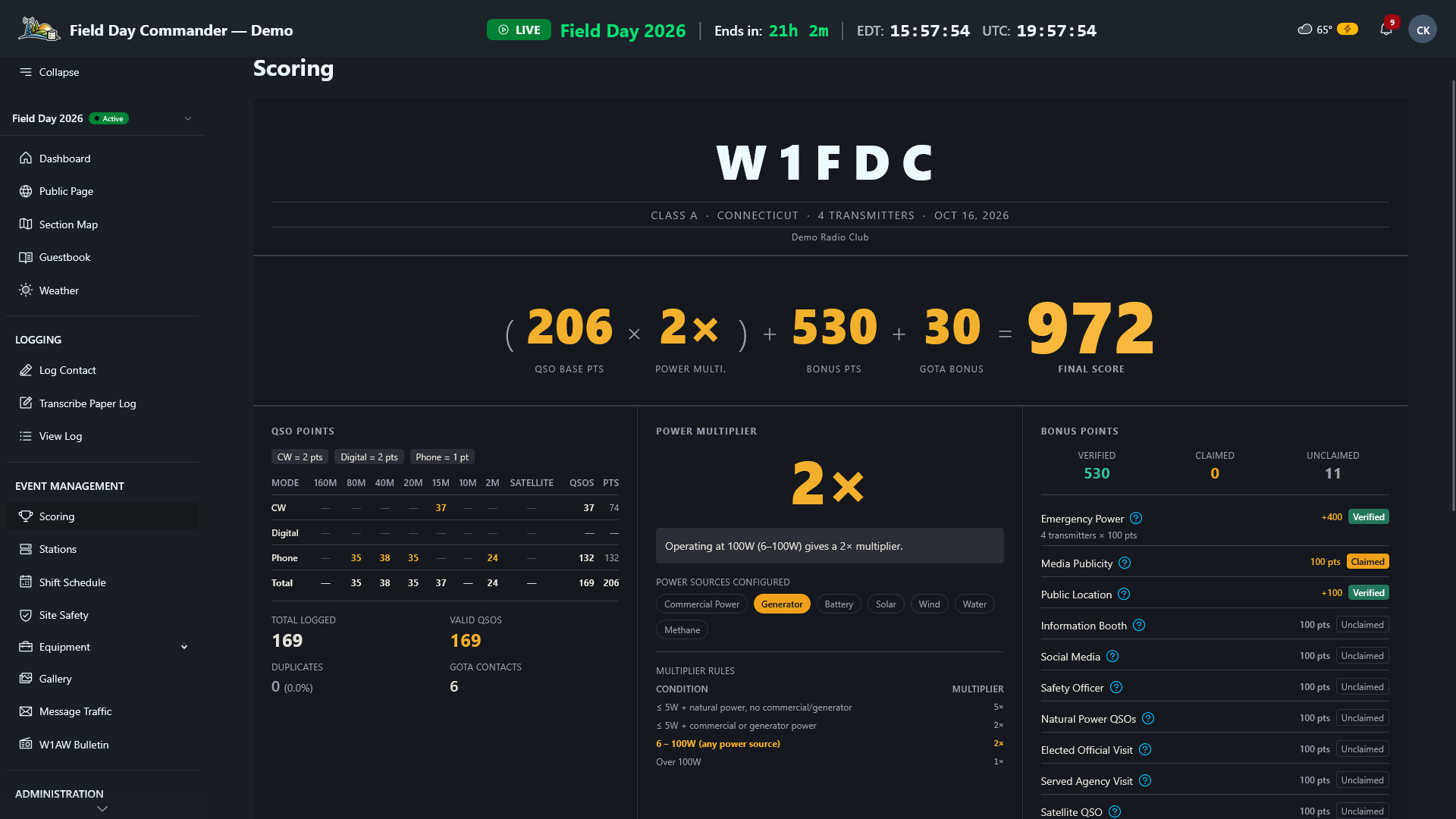
Open Event Management > Scoring. Go down the Bonus Points column and make sure every bonus you earned shows as claimed. If one is missing, Plan Your Bonuses and Objectives explains where each one comes from.
Then read the Corrections & Notices box at the bottom. It points out things worth fixing before you submit:
- Check for mistyped callsigns when reviewing duplicates. Look through View Log for near misses like K1ABC and K1ACB.
- Contacts logged with 0 points usually have the wrong band or mode.
- GOTA contacts with no GOTA station configured means GOTA was never turned on for the event, so those contacts earn nothing until you fix it.
- Review any bonus notices against the activity records and supporting proof. Plan Your Bonuses and Objectives explains which bonuses are tracked automatically and which you claim manually. A manual claim counts immediately, so check that the activity and proof support it before submitting.
Step 5: Download Your Files
Go to Administration > Reports. The Export & Download cards at the top are the ones you need:
- Cabrillo Log. This is your log of contacts, which the ARRL accepts in place of dupe sheets. It's saved as something like
w1abc-2026-field-day.log, with your callsign, section, claimed score, and every contact from every station. It doesn't carry your bonuses or most of the entry details. Those go on the web form. Duplicates are left out. GOTA contacts are in it under your GOTA callsign. - Submission Sheet. A PDF laid out like the ARRL's paper summary sheet: entry information, power sources, the bonuses you claimed, the claimed score, and a band and mode breakdown. It adds a GOTA page with each GOTA operator if you ran one, and the W1AW bulletin copy if you saved it in Field Day Commander. Use it as your checklist while you fill out the web form, and keep a copy for the club.
- ADIF Log. Not part of the entry, but handy for uploading to LoTW or importing into another logger.
Step 6: Gather the Proof
Use the applicable bonus requirements in ARRL rule 7.3 to check which supporting documents your claims need.
Some bonuses need proof uploaded with your entry. Collect it into one folder before you start the form:
- Copies of the SM/SEC message and every radiogram you're claiming
- The W1AW bulletin copy (on the submission sheet if you saved it in Field Day Commander)
- A copy of the media coverage
- The signed Safety Officer or Site Responsibilities checklist (see Work Through the Safety Checklist)
Bonuses like emergency power, public location, and the public information table don't need proof. Checking the box on the form is enough. If you typed notes when you claimed bonuses in Field Day Commander, they'll tell you where each piece of proof is.
Step 7: Submit on the ARRL Site
Go to the ARRL's Field Day entry web app at field-day.arrl.org. Fill in the entry with the submission sheet open beside you: your call, class, participants, power sources, QSO totals by band and mode, and GOTA totals. Check the box for each bonus you're claiming, including web submission. A bonus that needs proof has an upload button next to it, so attach the documents from your folder there. Then upload the Cabrillo log.
Once the ARRL accepts your entry, your call shows up on its Logs Received list.
Check section 8 of the ARRL 2026 rules for submission contents, accepted log formats, and that year’s deadline. For another year, use the packet on ARRL’s Field Day page. Don't leave it to the last week.
Save the Cabrillo file, the submission sheet, and your proof folder somewhere the whole club can find them, and make a backup of Field Day Commander too (see Back Up and Restore).