The ARRL rewards Field Day groups for taking site safety seriously, and Field Day Commander has the checklist built in. Your safety person can check items off on a phone or tablet as they walk the site, and the bonus is earned once the list is done. This guide covers who does it, how to set it up, and the signed copy the ARRL wants with your entry.
Which Checklist You Get
It depends on your operating class:
- Class A gets the Safety Officer checklist, worth 100 points. All 15 items are required.
- Classes B through F get the Site Responsibilities checklist, worth 50 points. It has 13 items written for smaller setups, and 8 of them are required, since a home station may have no generator or tent.
Winter Field Day doesn't have a safety bonus, so WFD events don't get a checklist.
Naming a safety officer isn't enough on its own. ARRL’s 2026 rules, sections 7.3.17–7.3.18 define these bonuses and require signed supporting checklists.
Step 1: Put Your Safety Person on the Schedule
Only someone signed up for a Safety Officer or Site Responsibilities shift can check items off. This is on purpose, so the record shows that the person responsible for safety did the walk-through. Admins and event managers are no exception. Without a shift, they can see the checklist but can't change it.
In Administration > Manage Schedule, add a shift for the right role and assign your safety person to it (see Volunteer Scheduling). Make it cover the whole event. The Safety Officer checklist starts with "Safety Officer/s or qualified designated assistant/s was on site for the duration of the event," and a two-hour shift doesn't make that case. The timeline on the Shift Dashboard (the Dashboard button on Event Management > Shift Schedule) shows at a glance whether the Safety Officer row runs from start to finish.
Scheduled, checked in, or checked out all count, so the safety officer can start during setup before their shift begins. A shift marked as a no-show doesn't.
Step 2: Adjust the List if You Need To
The default items match the ARRL checklists. If your club has its own rules, like keeping generators a set distance from the tents, add them in Administration > Manage Safety Checklist. Click Add Item, write the Label, add Help Text if the item needs explaining, pick the Checklist Type, and decide whether it's Required.
Changes apply to the current event only. Keep in mind that the Safety Officer bonus needs every item checked, including any you add. Removing an ARRL item to make the list easier doesn't change what the ARRL asks for on the paper checklist.
Step 3: Walk the Site
Open Event Management > Site Safety on a phone or tablet and take it with you. Each item has a checkbox, and the ones with help text have a ? icon you can tap for an explanation. Badges at the top count how many items are done and how many required items are done.
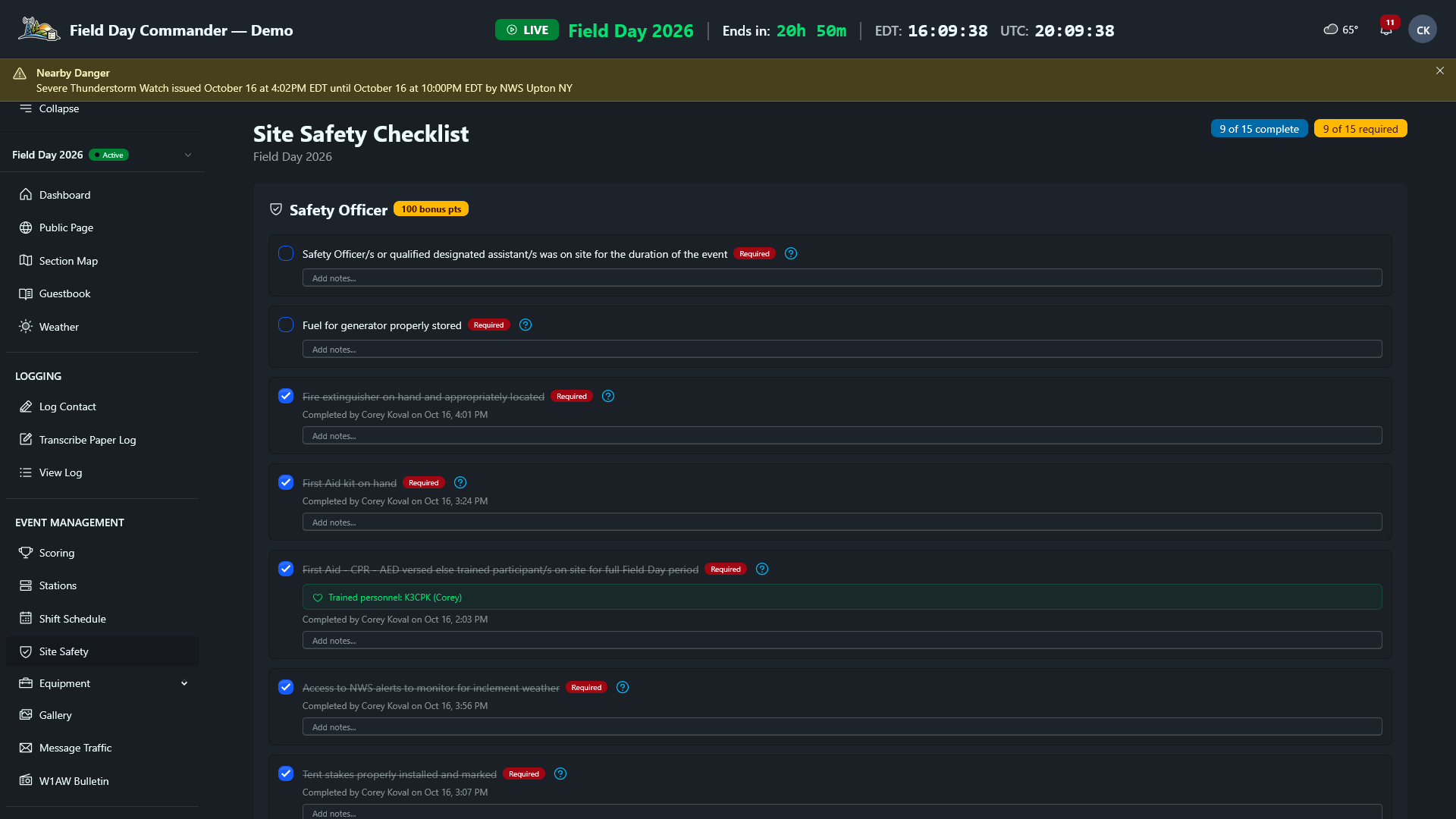
As you check each item, Field Day Commander records who did it and when, and saves it right away. Use the notes box under an item to write down what you saw: "Two extinguishers, one by each generator" or "Coax crossings taped down at the food tent." The notes are what make the record useful later, both for the signed checklist and for next year's planning.
For the CPR and AED item, the page lists everyone whose profile is marked CPR / AED trained, so you can see at a glance who's covering it. Ask trained members to check that box on their profile ahead of time.
Do the first pass during setup, when tent stakes and antenna guys go in. Then walk it again Saturday evening and Sunday morning. Conditions change as the weekend goes on. Cables get moved, the water runs low, and a storm can roll in. If something stops being true, uncheck the item until it's fixed.
When the Bonus Is Earned
The bonus shows up on the Scoring page once the checklist reaches this point:
- Safety Officer: when every item is checked
- Site Responsibilities: when every required item is checked and more than half of the whole list is done
Unchecking an item that drops you below that line takes the bonus back, so the score always matches the checklist.
The Signed Copy
To claim either bonus, the ARRL wants a signed copy of the checklist with your entry. Field Day Commander doesn't print one, so download the 2026 Safety Officer checklist or 2026 Site Responsibilities checklist. For a different year, get the corresponding forms from ARRL’s Field Day resources. Fill it in from the Site Safety page, using its notes and who-did-it record, then have your safety person sign it. Scan or photograph it and keep it with the rest of your proof. Submit Your Field Day Entry covers sending it in.