The event starts weeks before the first QSO
Define your stations, assign equipment, build the volunteer schedule, and run through safety checklists, all in one place. When Field Day arrives, your club shows up and everything is already organized.
- ✓ Station definitions with band and mode configuration
- ✓ Volunteer scheduling with shift blocks and gap detection
- ✓ 15-item ARRL safety checklist with required/complete tracking
- ✓ Event readiness dashboard to see what's done and what's left at a glance
Real-time logging across every station
Multiple operators on multiple devices entering contacts at the same time. FD Commander merges everything into a single, unified log in real time. No conflicts, no manual deduplication after the event.
- ✓ Dupes flagged instantly across all stations and bands
- ✓ Section and exchange validation catches typos before they're saved
- ✓ Cabrillo export ready for ARRL submission
- ✓ Single-field entry flow designed for speed: type the exchange, hit Enter, done
| UTC | Callsign | Section | |
|---|---|---|---|
| 18:48 | VE3DZ | ON | |
| 18:45 | N3FJP | MDC | |
| 18:44 | K5ZD | EMA | |
| 18:42 | W1AW | CT |
Bring contacts in from external loggers
Already running WSJT-X for FT8, N1MM Logger+ for CW, or fldigi for RTTY? FD Commander receives contacts directly from those programs over UDP, so operators don't have to double-log. You can also import an ADIF file after the fact with a guided wizard that parses the file, maps stations, validates records, and lets you review everything before it hits your log.
- ✓ N1MM Logger+ UDP broadcast listener with live packet and error stats
- ✓ WSJT-X / JTDX UDP ADIF listener for FT8, FT4, and other digital modes
- ✓ Generic ADIF UDP endpoint for fldigi and any logger that can send ADIF over UDP
- ✓ ADIF file import wizard: upload, parse, map fields to stations, review, and import
- ✓ Validation catches records outside the event window, flags dupes, and lets you skip or fix before importing
- ✓ Configurable UDP ports with firewall instructions for each listener
Built for real field conditions
Two layers of resilience. First: the entire platform runs on your LAN with no internet dependency at all, fully air-gapped. Second: if a browser temporarily loses its connection to the server, contacts queue locally and sync when it reconnects. Need remote access? The app is secure enough to put on the internet too.
- ✓ Air-gapped operation with no cloud and no external services
- ✓ If a device loses connection, operators keep logging without interruption
- ✓ Queued contacts shown with a clear status indicator
- ✓ Queued contacts sync automatically when the connection comes back
- ✓ Paper log transcription with correct timestamps if you need to go fully manual
Know your score without doing math
Power multipliers, bonus points, and band breakdowns are all calculated as contacts come in. Put the dashboard on a big screen so the whole club can see where things stand.
- ✓ Power multiplier auto-calculated from your configured power sources
- ✓ All 18 ARRL bonus categories tracked (claimed, verified, or unclaimed)
- ✓ W1AW bulletin page with transmission schedule and 15-minute reminders
- ✓ QSO points weighted by mode: CW/Digital = 2 pts, Phone = 1 pt
- ✓ Everyone sees the same live score, on every screen
See where your contacts are coming from
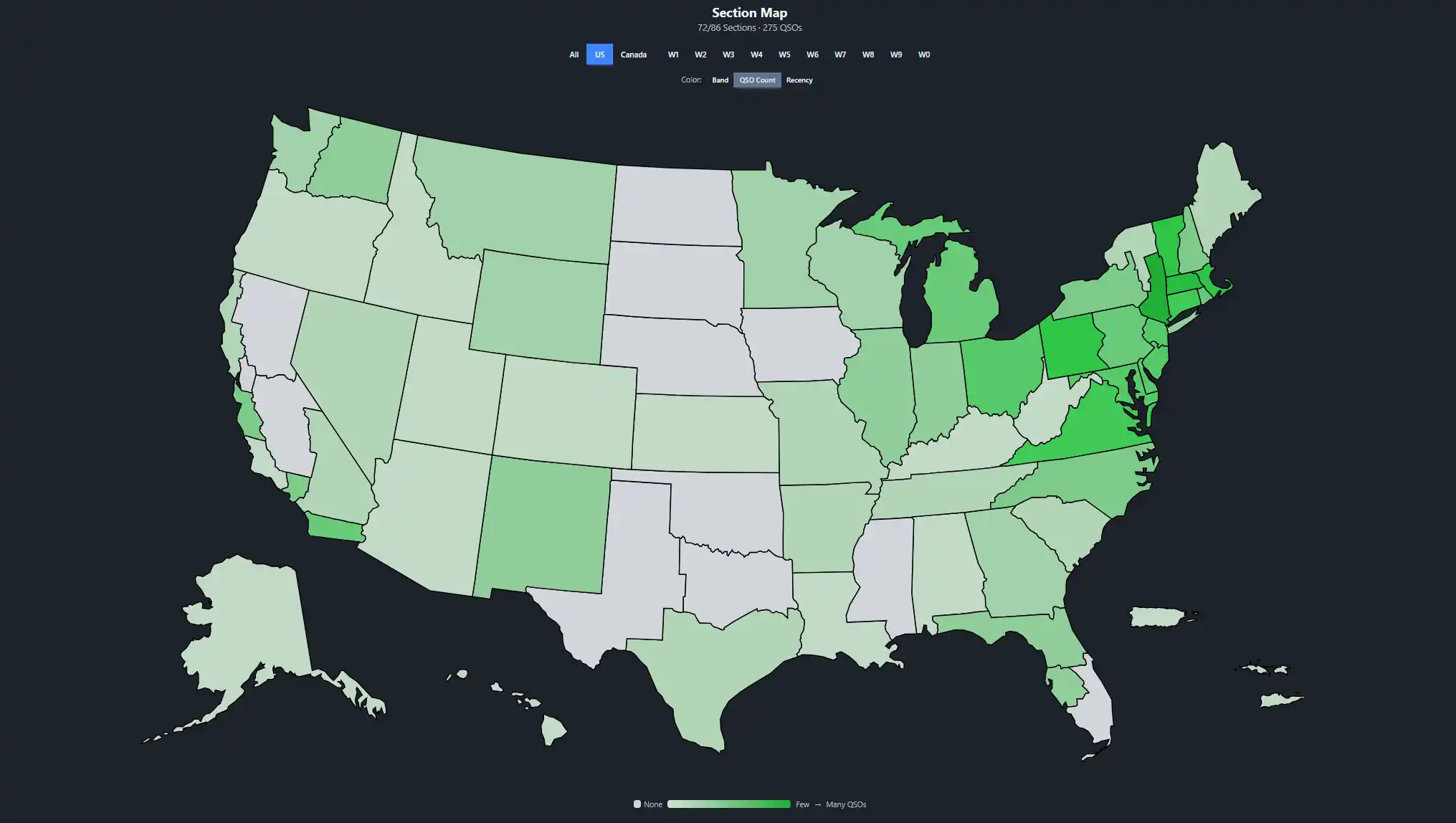
The Section Map gives your whole club a live, visual picture of how the event is going. Every ARRL and RAC section lights up as contacts come in. Filter by call area or switch between color modes to see band distribution, QSO density, or how recently each section was worked. Put it on a big screen at the site and let everyone see which sections you still need.
- ✓ Interactive map of all 86 ARRL/RAC sections across the US and Canada
- ✓ Filter by region: All, US, Canada, or individual call areas (W1 through W0)
- ✓ Three color modes: Band (which band worked each section), QSO Count (heat map), and Recency (how fresh the contact is)
- ✓ Color intensity shows depth: pastel for 1 band, vivid for 2, deep for 3+
- ✓ Hover any section to see QSO count, bands, modes, and time since last contact
- ✓ Updates in real time as contacts are logged
No more clipboard sign-up sheets
Build the full 24-hour schedule before the event starts. Operators sign themselves up for open slots, and managers can see coverage gaps at a glance.
- ✓ Operators self-sign-up for open time slots
- ✓ Fill-status indicators show gaps before they become problems
- ✓ Schedule any role: operators, safety officers, public information table
- ✓ "My Shifts" view so every volunteer knows when they're up
Know where every piece of gear is
Every operator has a personal "My Catalog" for their own gear. Commit equipment to upcoming events, assign gear to stations, and track availability across the whole operation.
- ✓ Personal catalogs with photo, make/model, serial number, and tags
- ✓ Event Commitments to pledge your gear ahead of time
- ✓ Searchable and filterable by type, status, and owner
- ✓ Assign gear to specific stations before the event
| Make/Model | Type | Assigned To | Status |
|---|---|---|---|
| Icom IC-7300 | Radio | Station 1 | Delivered |
| Yaesu FT-991A | Radio | Station 2 | Delivered |
| Fan Dipole (80/40/20) | Antenna | Station 1 | Committed |
| Hex Beam | Antenna | Station 3 | Committed |
| TH-D75A | Radio | - | Returned |
A guestbook for everyone who stops by
Field Day is a public event. When visitors come to check out your operation, they can sign the digital guestbook right from any device on the network. Track guest count for ARRL bonus points and build a record of community engagement.
- ✓ Visitors sign in with name and optional callsign
- ✓ Guest count tracked for public information bonus points
- ✓ Visitors can sign themselves in, no account or password needed
- ✓ Exportable log of all visitors for club records
Capture the event in photos
Upload photos as the event unfolds: antenna raises, station setups, the team working pileups at 2 AM. Everything is stored on the local server, and operators can contribute from any device on the network.
- ✓ Upload photos from any connected device
- ✓ Everything stays on your network. No cloud accounts or uploads to third parties
- ✓ Browse the gallery to see the full event timeline
- ✓ Great for club newsletters, social media, and ARRL submissions